標籤:程式碼片段 部落格 格式化數字 array using 2.3 模式 啟動 append
一、Thymeleaf介紹
Thymeleaf是一種Java XML / XHTML / HTML5模板引擎,可以在Web和非Web環境中使用。它更適合在基於MVC的Web應用程式的視圖層提供XHTML / HTML5,但即使在離線環境中,它也可以處理任何XML檔案。它提供了完整的Spring Framework整合。
關於Spring推薦Thymeleaf的這種說法,我在Spring官方文檔並沒有看到具體的說明,只是在和JSP比較的時候,說了JSP和Thymeleaf對比JSP的一些不足,而Thymeleaf只是作為其他模板引擎的一種代表。
作為一款優秀的模板引擎,除了易用性、活躍的社區、健康快速的發展外,還有非常重要的一點就是效能了,那Thymeleaf 3 和 FreeMaker 的效能對比是怎麼樣的,後續文章會陸續更新。
## 二、Thymeleaf基礎使用Thymeleaf的使用是由兩部分組成的:標籤 + 運算式,標籤是Thymeleaf的文法結構,而運算式就是文法裡的內容實現。通過標籤 + 運算式,讓資料和模板結合,最終轉換成html代碼,返回給使用者。Thymeleaf基礎使用分為三部分:1. 標籤使用2. 運算式使用3. 設定IDEA 對 Thymeleaf 代碼補全### 1.標籤使用#### 1.1 th:text 基礎資訊輸出HTML代碼:``` 王磊的部落格```Java代碼:```@RequestMapping("/")public ModelAndView index() { ModelAndView modelAndView = new ModelAndView("/index"); modelAndView.addObject("name", "老王"); return modelAndView;}```最終效果: `老王`#### 1.2 th:utext html內容輸出使用"th:text"是對內容的原樣輸出,使用“th:utext”可以進行html標籤輸出。Java代碼:```@RequestMapping("/eat")public ModelAndView eat() { ModelAndView modelAndView = new ModelAndView("/cat"); modelAndView.addObject("data", "老王是吃貨"); return modelAndView;}```HTML代碼:``````展示效果: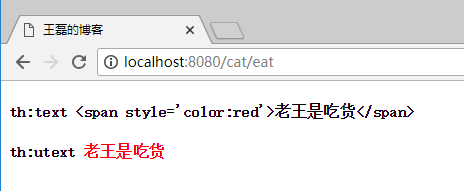#### 1.3 th:if, th:unless 條件判斷``` 成年 未成年```th:if為滿足條件的業務處理,th:unless正好相反,是除去的意思。#### 1.4 th:switch, th:case 多條件判斷``` 18歲 19歲 其他```**注意:** 預設選項使用`th:case="*"` 指定。#### 1.5 th:each 迴圈HTML代碼:``` ```Java代碼: ```@RequestMapping("/")public ModelAndView index() { ArrayList names = new ArrayList<>(); names.add("java"); names.add("golang"); names.add("nodejs"); ModelAndView modelAndView = new ModelAndView("/index"); modelAndView.addObject("names",names); return modelAndView;}```訪問效果如下: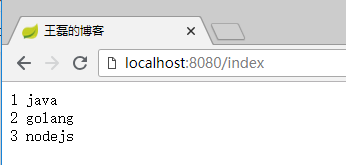其中item為每行的詳細值,key值如下:- index 下標,從0開始- count 第x個,從1開始- size 這個集合的大小- current 當前行的值#### 1.6 th:fragment、th:insert、th:replace、th:include 程式碼片段複用- th:fragment標籤是聲明程式碼片段,用於解決代碼複用的問題,好比Java程式寫的公用代碼一樣,每個需要的地方都可以直接調用;- th:insert 引用fragment的代碼,保留自己的主標籤;- th:replace 引用fragment的代碼,不保留自己的主標籤;- th:include 使用類似th:replace,Thymeleaf3.0之後不推薦使用;footer.html頁面代碼:``` 王磊的部落格 ? 著作權歸 老王 所有 關於 CCTV```聲明了兩個程式碼片段,copyright和about。cat.html頁面代碼:``` 王磊的部落格```其中第一個div引用了footer.html 的 copyright 程式碼片段,第二個div引用了 footer.html 的 about 程式碼片段。**雙冒號的理解:** 其中使用“::”雙冒號來完成對頁面片段的引用,有點像php裡面的文法,使用雙冒號來表示對類的靜態屬性和方法進行直接引用。執行效果如: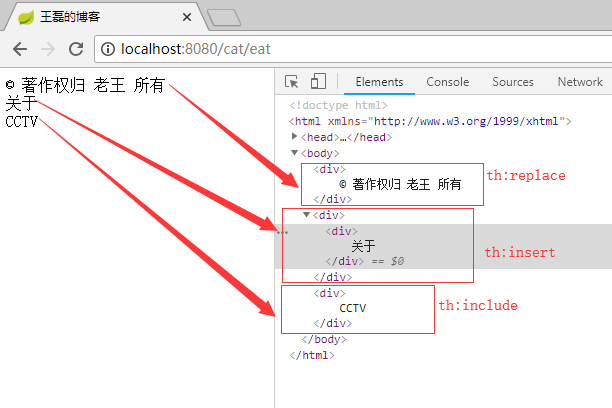**總結:** 可以很清晰的看出th:insert、th:replace、th:include之間的區別,在於是否保留自己的主標籤,th:include 在3.0之後已經不推薦使用了,可以使用th:replace標籤替代。##### 提高班——fragment代碼傳參使用fragment我們是可以在html代碼中傳參的,比如我們定義了一個top.html其中有一個“歡迎XXX”的提示,而這個人名XXX就是需要動態傳遞的,這樣我們可以最大程度的完成代碼的複用,這個時候就是一個很好的使用情境,我們需要這樣做。頁面main.html代碼:``` 王磊的部落格```頁面top.html``` 王磊的部落格 ```最終的效果: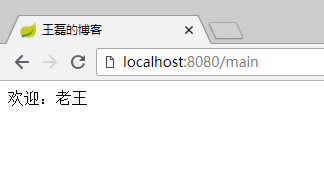#### 1.7 th:with 定義局部變數 頁面代碼:```html 王磊的部落格 ```頁面輸出結果:2#### 1.8 th:remove 刪除標籤th:remove用於html代碼的刪除,th:remove值有五個:- all 刪除本段所有代碼- body 刪除主標籤內的所有元素- tag 刪除主標籤,保留主標籤所有的元素- all-but-first 保留主標籤和第一個元素,其他全部刪除- none 不刪除任何標籤樣本index.html代碼如下:``` 王磊的部落格 all 1 body 2 tag 3 all-but-first 4 none 5```最終展示效果如下: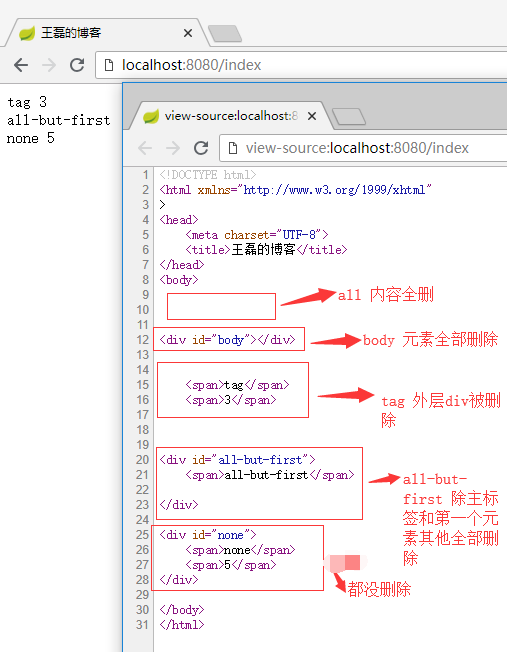#### 1.9 其他標籤- th:style 定義樣式 ``- th:onclick 點擊事件 ``- th:href 賦值屬性href ``- th:value 賦值屬性value ``- th:src 賦值src ``- th:action 賦值屬性action ``- th:id 賦值屬性id ``- th:attr 定義多個屬性 ``- th:object 定義一個對象 ``- ...### 2.運算式使用#### 2.1 運算式概要##### 2.1.1 簡單運算式Variant 運算式:${...}選擇Variant 運算式:*{...}訊息運算式:#{...}連結資料表達式:@{...}片段表達:~{...}##### 2.1.2 資料的類型文字:‘one text‘, ‘Another one!‘,…數字文字:0, 34, 3.0, 12.3,…布爾文字:true, falseNULL文字:null文字標記:one, sometext, main,…##### 2.1.3 文本操作字串拼接:+字面替換:|The name is ${name}|##### 2.1.4 算術運算二進位運算子:+, -, *, /, %減號(一元運算子):-##### 2.1.5 布爾運算二進位運算子:and, or布爾否定(一元運算子):!, false##### 2.1.6 條件運算子比較值:>, <, >=, <=相等判斷: ==, != ##### 2.1.7 條件判斷如果-然後:(if) ? (then)如果-然後-否則:(if) ? (then) : (else)違約:(value) ?: (defaultvalue)所有以上這些運算式都可以組合和嵌套,例如: > ‘User is of type ‘ + (${user.isAdmin()} ? ‘Administrator‘ : (${user.type} ?: ‘Unknown‘))#### 2.2 運算式使用執行個體##### 2.2.1 Variant 運算式 ${...}Variant 運算式的使用,我們前面的代碼已經見到了,$是我們平常開發中最常用的運算式,用於把後台Java類的動態資料,映射到頁面,例如:Java代碼:```javapublic ModelAndView index() { ModelAndView modelAndView = new ModelAndView("/cat"); modelAndView.addObject("data", "我是老王"); return modelAndView;}```HTML代碼:``` 王磊的部落格```最終效果: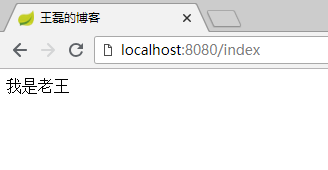##### 2.2.2 選擇運算式 *{...}選擇運算式相當於選擇了一個對象,在使用的時候不在需要這個對象的首碼,直接使用屬性的key進行內容展示,代碼如下:```html ```最終效果:```iMac 7999.0 2018-08-10 14:03:51```**總結:** *{price} = ${goods.price}只是省去了“goods.”首碼,效果都是一樣的。##### 2.2.3 連結資料表達式 @{...}用於轉換url,代碼如下:```連結```最終呈現的效果:` 連結 `連結資料表達式,可以傳遞參數,用逗號分隔。伺服器根相對路徑:@{~/path/to/something} ##### 2.2.4 文本操作文本操作分為兩個:文本拼加、文本替換**文本拼加:**```html```**文本替換:**文本替換的文法:|內容${tag}|```html```##### 2.2.5 三元運算式> ##### 2.2.6 雙括弧作用```html
...
...
```結果:```html
1234567890
1,234,567,890
```##### 2.2.7 嵌入文字標籤雖然標準的標籤幾乎可以滿足所有的業務情境,但某些情況我們更喜歡直接寫入HTML文本,例如:```
Hello, [[${name}]]
```嵌入文本有兩種寫法“[[...]]”和“[(...)]”,分別的作用就像th:text 和 th:utext 一樣,例如:```
[[${name}]]
[(${name})]
```看到的效果是這樣的: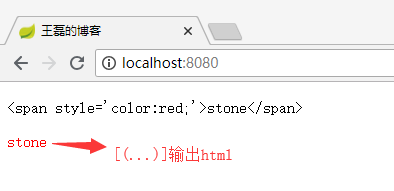#### 2.3 運算式對象概述運算式裡面的對象可以協助我們處理要展示的內容,比如運算式的工具類dates可以格式化時間,這些內建類的熟練使用,可以讓我們使用Thymeleaf的效率提高很多。##### 2.3.1 運算式基本對象- `#ctx`: 操作當前上下文.- `#vars:` 操作上下文變數.- `#request`: (僅適用於Web項目) `HttpServletRequest`對象.- `#response`: (僅適用於Web項目) `HttpServletResponse` 對象.- `#session`: (僅適用於Web項目) `HttpSession` 對象.- `#servletContext`: (僅適用於Web項目) `ServletContext` 對象.##### 2.3.2 運算式工具 + 生產力類- `#execInfo`: 操作模板的工具類,包含了一些模板資訊,比如:`${#execInfo.templateName}` .- `#uris`: url處理的工具- `#conversions`: methods for executing the configured *conversion service* (if any).- `#dates`: 方法來源於 `java.util.Date` 對象,用於處理時間,比如:格式化.- `#calendars`: 類似於 `#dates`, 但是來自於 `java.util.Calendar` 對象.- `#numbers`: 用于格式化數字.- `#strings`: methods for `String` objects: contains, startsWith, prepending/appending, etc.- `#objects`: 普通的object對象方法.- `#bools`: 判斷bool類型的工具.- `#arrays`: 數組操作工具.- `#lists`: 列表操作資料.- `#sets`: Set操作工具.- `#maps`: Map操作工具.- `#aggregates`: 運算元組或集合的工具.每個類中的具體方法,點擊查看:https://www.thymeleaf.org/doc/tutorials/3.0/usingthymeleaf.html#appendix-b-expression-utility-objects### 3.IDEA設定Thymeleaf自動補全先上: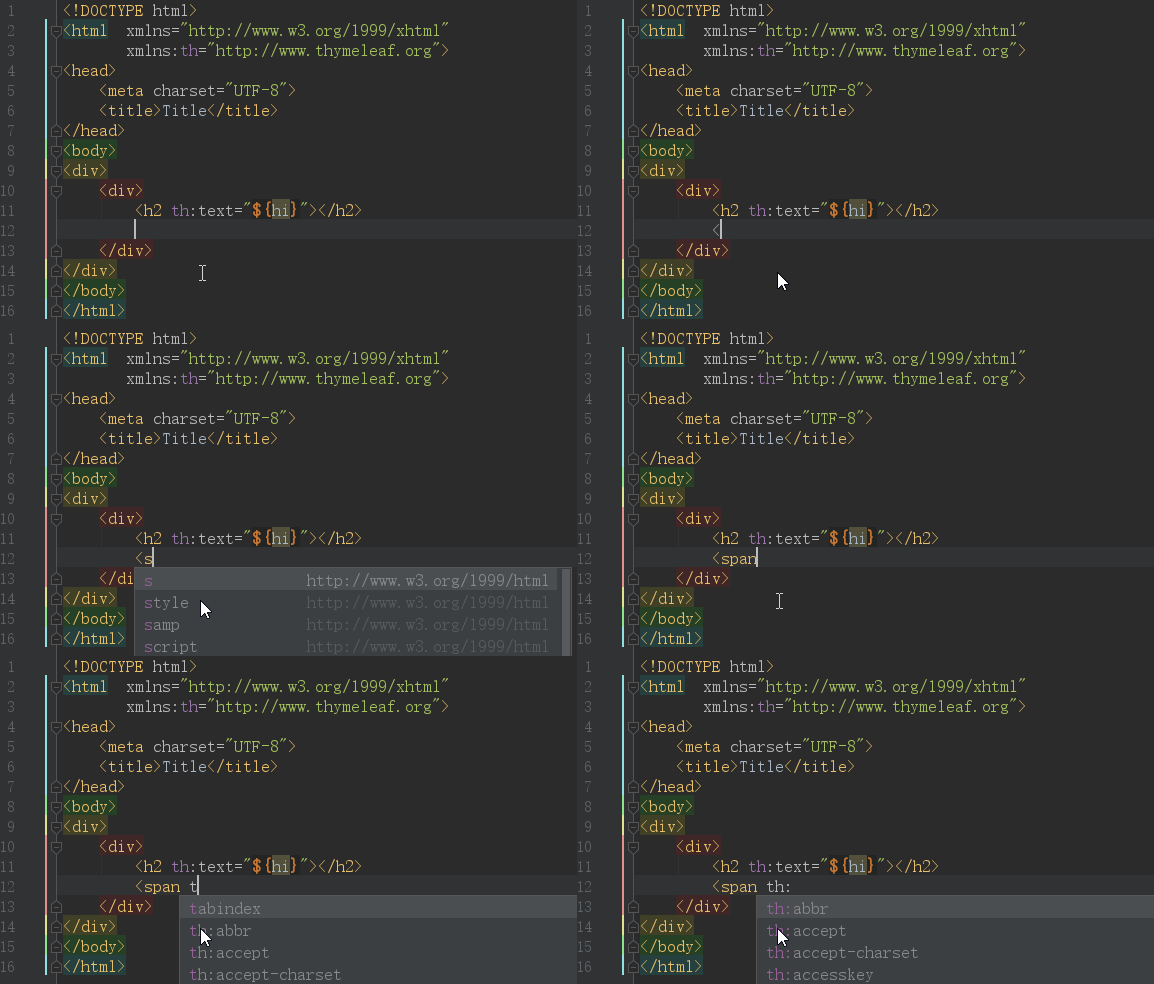IDEA預設是開啟了Thymeleaf 外掛程式支援的,如果不放心需要驗證,請訪問:https://www.jetbrains.com/help/idea/2018.2/thymeleaf.html但僅僅是配置上面的效果,依然是無法正常使用的,原因是你要在html中聲明 Thymeleaf 命名空間 `xmlns:th="http://www.thymeleaf.org"` ,完整代碼如下:```html Title ```其中關鍵的代碼是:> xmlns:th="http://www.thymeleaf.org"這樣當你在代碼輸入“th:”的時候就會看到 Thymeleaf 的所有標籤了。## 三、Spring Boot 整合 Thymeleaf### 3.1 開發環境- Spring Boot 2.0.4- Thymeleaf 3.0.9- Jdk 8- Windows 10- IDEA 2018.2在正式整合Thymeleaf引擎之前,先來看下目錄結構### 3.2 Spring MVC目錄結構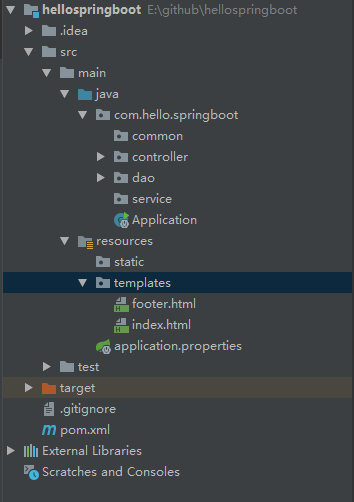除去包名,我們來解釋一下這些目錄代表的含義:- common 通用公用類- controller 控制器類- dao 資料互動類- service 商務邏輯處理類- Application.java 開機檔案- resources 靜態檔案儲存體檔案夾- resources/templates 所有的Thymeleaf目錄存放目錄- resources/application.properties 全域配置類- pom.xml Maven 設定檔### 3.3 Spring Boot 整合 Thymeleaf 分為四步:1. pom.xml 添加 Thymeleaf 模板引擎2. application.properties 配置 Thymeleaf 資訊3. 建立controller類,編寫代碼4. 建立模板,編寫html代碼接下來我們具體分別來看具體的步驟。#### 3.3.1 pom.xml 添加 Thymeleaf 模板引擎``` org.springframework.boot spring-boot-starter-thymeleaf```#### 3.3.2 application.properties 配置 Thymeleaf 資訊```# 啟用緩衝:建議生產開啟spring.thymeleaf.cache=false# 建議模版是否存在spring.thymeleaf.check-template-location=true# Content-Type 值spring.thymeleaf.servlet.content-type=text/html# 是否啟用spring.thymeleaf.enabled=true# 模版編碼spring.thymeleaf.encoding=utf-8# 應該從解析中排除的視圖名稱列表(用逗號分隔)spring.thymeleaf.excluded-view-names=# 模版模式spring.thymeleaf.mode=HTML5# 模版存放路徑spring.thymeleaf.prefix=classpath:/templates/# 模版尾碼spring.thymeleaf.suffix=.html```##### Thymeleaf常用配置說明| 配置項 | 類型 | 預設值 | 建議值 | 說明 || :------| :-----: | :-----:| :-----:| :------|| spring.thymeleaf.enabled | bool | true | 預設 | 是否啟用 || spring.thymeleaf.mode | String | HTML | 預設 | 模板類型,可以設定為HTML5 || spring.thymeleaf.cache | bool | true | 預設 | 是否啟用緩衝,產生環境建議設定為true || spring.thymeleaf.prefix | String | classpath:/templates/ | 預設 | 模版存放路徑 || spring.thymeleaf.suffix | String | .html | 預設 | 模版尾碼 || spring.thymeleaf.servlet.content-type | String | text/html | 預設 | Content-Type 值 || spring.thymeleaf.encoding | String | - | utf-8 | 模版編碼 |#### 3.3.3 建立controller類,編寫代碼我們在controller檔案夾建立index.java,代碼如下:```javapackage com.hello.springboot.controller;import org.springframework.stereotype.Controller;import org.springframework.web.bind.annotation.RequestMapping;import org.springframework.web.servlet.ModelAndView;@Controller@RequestMapping("/")public class Index { @RequestMapping("/") public ModelAndView index() { ModelAndView modelAndView = new ModelAndView("/index"); modelAndView.addObject("name", "王磊的部落格"); return modelAndView; }}```關鍵代碼解讀:1. @ResponseBody註解:如果使用該註解,返回結果會直接輸出,而不是使用模板引擎渲染 2. 使用ModelAndView對象,指定視圖名&添加視圖對象 #### 3.3.4 建立模板,編寫html代碼我們在resources/templates下建立index.html,代碼如下:```html 王磊的部落格```啟動調試,在瀏覽器輸入:http://localhost:8080/效果如下: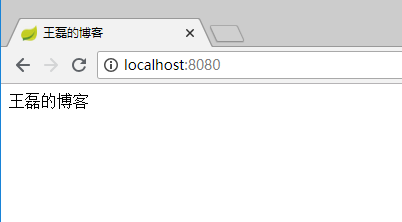相關代碼GitHub:https://github.com/vipstone/springboot-example.git## 四、參考資料thymeleaf官方文檔 Thymeleaf :https://www.thymeleaf.org/doc/tutorials/3.0/usingthymeleaf.htmlthymeleaf官方文檔 Spring + Thymeleaf :https://www.thymeleaf.org/doc/tutorials/3.0/thymeleafspring.html
Spring Boot 最佳實務(四)模板引擎Thymeleaf整合



